Resos Alternative for Shopify: 3 Options Compared



Editorial disclosure: Apselo makes Reservics, one of the apps compared here. Prices and product claims were checked against vendor pages and Shopify App Store listings, and we point out where Reservics is weaker than the alternatives.
If you run a restaurant on Shopify and already take bookings through Resos, nothing is necessarily broken. Most people searching for a Resos alternative for Shopify are not unhappy with Resos at all. Resos works.
It is restaurant-focused, its base pricing is reasonable, and it does not charge booking commission or cover fees. You can embed its booking widget on a Shopify storefront, but bookings are still managed in Resos rather than in Shopify Admin, and that is usually where the cost shows up: a second dashboard, guest records in two places, and deposits on a separate payment rail.
So the useful question is not:
“Is Resos too expensive?”
It is:
Where should your bookings, guest information, and deposits live?
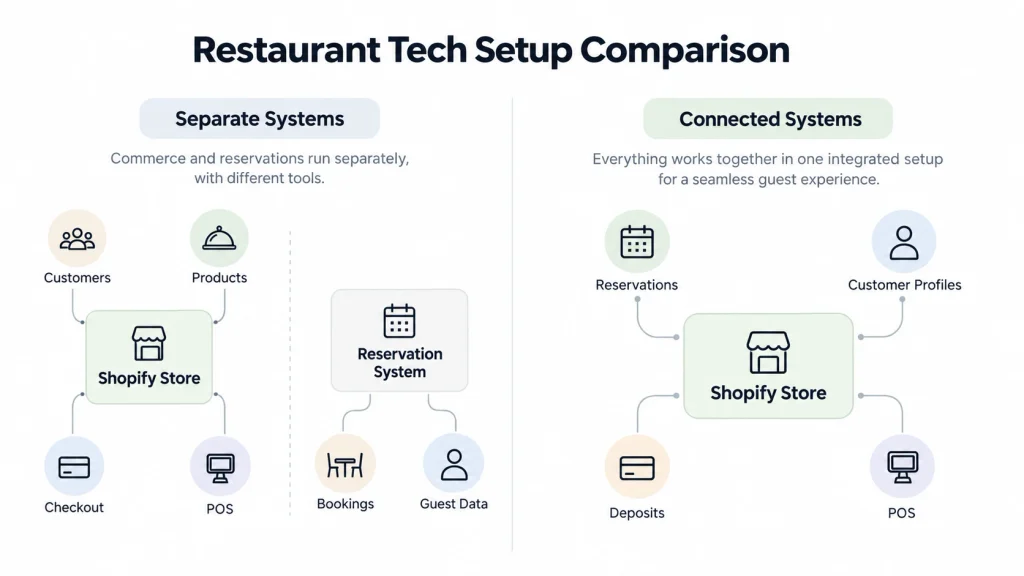
Your Shopify customers, orders, checkout, gift cards, and maybe your POS already live in one system. Your reservations can live in another. Sometimes that separation is perfectly fine. Sometimes it creates extra work every day.
This guide will help you work out which situation you are in before you start looking for a Resos alternative for Shopify.
What is the best Resos alternative for Shopify?
There is no single option that is better than Resos for every restaurant. If you already run Shopify and want reservations, deposits, and POS in one place, Reservics is one Shopify-native option built specifically around restaurant reservations, deposits, floor management, and Shopify POS. Cowlendar suits merchants who value a long public Shopify track record over restaurant-specific floor tools. Tablein fits restaurants that want another dedicated hospitality platform.
Start with the problem you want to fix. If Resos already manages your floor well, you may want to stay. If staff keep jumping between Shopify and a separate reservation system, a Shopify app becomes more interesting.
If you are mainly comparing price, calculate the full Resos setup you actually use first.
TL;DR: Resos alternatives for Shopify
| Question | Quick answer |
|---|---|
| What does Resos do? | Restaurant reservations, table planning, guest records, waitlists, and deposits, in a system that sits outside Shopify. |
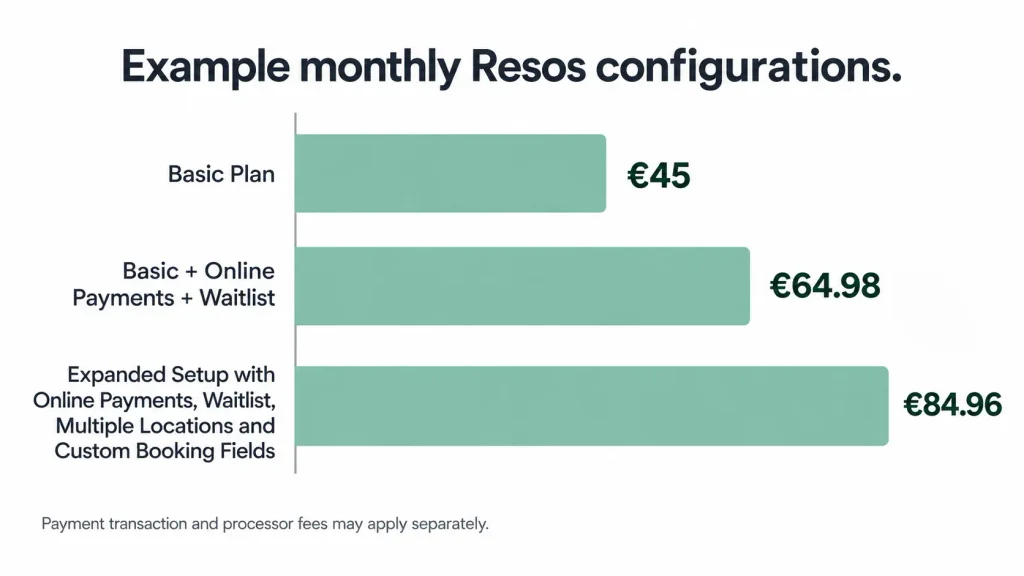
| What can Resos cost with common add-ons? | Basic starts at €45/month. An example setup with Online payments, Waitlist, a second location, and custom booking fields totals €84.96/month at individually listed add-on prices. Resos also offers an Annual All-Access bundle whose price is not published. |
| How are deposits processed? | Through a connected Stripe account rather than Shopify Checkout. Online payments is a paid add-on (€11.99/month), Resos charges 2% on payments actually processed, and Stripe processing fees are charged separately. |
| When does Resos still fit? | When floor tools, Reserve with Google, or your team’s existing habits matter more than keeping data inside Shopify. |
| When should you look at alternatives? | When bookings, guest records, and deposits should live in the same place as the rest of your store. |
| Shopify-native restaurant option | Reservics: free plan with unlimited bookings, Pro at $9.99, deposits through Shopify Checkout. We make it, so verify the claims. |
| Standalone restaurant platform | Tablein, from €67 or $79 per restaurant (Starter includes 50 reservations, then €0.67 each), if you want another dedicated hospitality platform. |
How do Resos, Cowlendar, Reservics, and Tablein compare?
Cowlendar has the deepest Shopify review history of the Shopify apps in this shortlist. Reservics is focused specifically on restaurant reservations inside Shopify. Tablein is restaurant-first but remains a separate platform, much like Resos.
Ratings and prices checked September 23, 2026. Both move over time, so open the listings before you decide.
| Product | Best for | Free plan | Entry paid plan | Entry-plan limit | Deposits | Shopify App Store rating |
|---|---|---|---|---|---|---|
| Resos | Dedicated restaurant reservation management | Yes, 25 bookings | €45 | 350 bookings/month | Paid add-on via Stripe | Not on the App Store |
| Cowlendar | Established Shopify booking workflows | Yes, 5 bookings | $13.99 | Up to $1,000 booking revenue/month | Available | 4.9 ★ (2,236 reviews) |
| Reservics | Restaurant bookings inside Shopify | Yes, unlimited bookings | $9.99 | Unlimited bookings, up to 3 locations | Pro via Shopify Checkout | 5.0 ★ (1 review) |
| Tablein | Dedicated restaurant platform | No, 14-day free trial | €67 / $79 | 50 reservations, then €0.67 each | Included in platform | Not on the App Store |
The Cowlendar listing shows 4.9 stars from 2,236 reviews and the Reservics listing shows 5.0 stars from 1 review. Both counts were checked on the date above and will change, so open the listings on the day you decide.
Do not read two similar star ratings as two similar track records. It tells you something narrower. Cowlendar has far more public Shopify evidence behind it.
Reservics is much newer. Those are different risk profiles.
What does Resos already do well?
Resos is a restaurant reservation system built around tables, guests, bookings, floor plans, reminders, payments, and day-to-day restaurant operations. That restaurant focus is one of its biggest strengths.
A general booking app can give someone a time slot. A restaurant system also needs to deal with tables, party sizes, seating capacity, walk-ins, busy dinner periods, and what your host needs to see during service. The current Resos Free plan allows 25 bookings per month.
Basic costs €45 per month for 350 bookings. Plus costs €85 for 750 bookings. Unlimited costs €125 with unlimited bookings.
At the time of this update, Resos is also showing a 50% promotion for the first three months of monthly paid plans, with €23, €43, and €63 displayed. Paid plans can be paused or cancelled, and Resos lists a 90-day money-back guarantee.
Resos says it charges “no commission or cover fees.” It also states that it does not charge per booking.
So this is not an OpenTable-style cover-fee argument. If that is the model you are actually comparing, switching from OpenTable is a different decision because its pricing model includes different considerations.
Resos also publishes unusually detailed restaurant data. The Resos No-Show Index 2026 covers 3,768,761 reservations across 2,417 restaurants between August 2025 and July 2026. The recorded no-show rate was 2.33%.
That gives restaurant owners something useful to benchmark against instead of relying on vague industry claims. If no-shows are the reason you are reviewing your booking setup, our guide to reducing restaurant no-shows covers the mechanics that actually move that number.
If your team already likes Resos and you do not care that it sits outside Shopify, there may be no strong reason to move.
How does Resos work with Shopify?
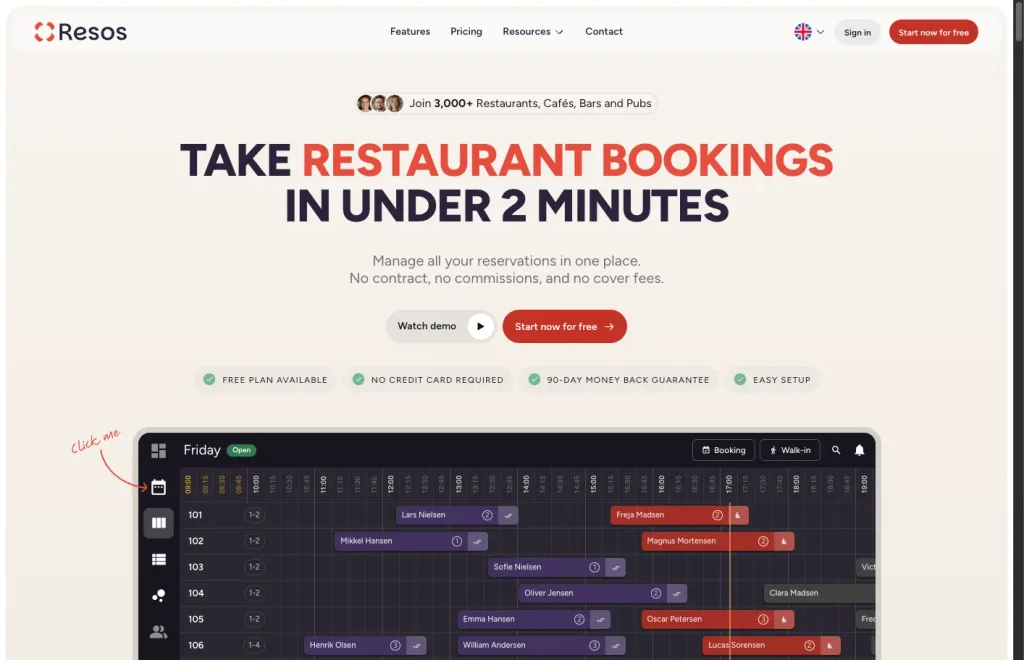
Resos can be embedded on a Shopify storefront, but it is not a Shopify App Store app that we could find on September 23, 2026. Its booking widget goes into a custom HTML or code block on your Shopify site, while bookings, guests, and deposits are managed in Resos rather than in Shopify Admin.
The practical difference is easier to understand with a guest example. Someone buys a gift card from your Shopify store in November. The same person books dinner through Resos in December.
Both actions belong to the same customer in real life. But the purchase belongs to Shopify, while the reservation belongs to Resos. For many restaurants, that is fine.
For a restaurant using Shopify for gift cards, merchandise, online sales, customer marketing, or POS, that separation can become more noticeable. Your staff may work across two systems. Customer activity can sit in two places.
A campaign based on recent restaurant bookings may require extra syncing. Resos does offer integrations and Full API access. Its current pricing page lists Full API access as a €11.99 per month add-on. That gives you ways to connect systems.
But connecting two systems and working primarily from one system are not the same thing. This is the strongest reason to consider moving from Resos. Not because Resos fails to take bookings.
Because you may want your bookings closer to the store that already runs the rest of your customer activity. Joining those records is what makes repeat-guest marketing possible, which we cover in turning first-time diners into regulars.
Can Resos deposits go through Shopify Checkout?
No. Resos Online payments use Resos with a connected Stripe account rather than your Shopify Checkout. Resos connects the payment to the booking while Stripe processes the money and manages payouts.
Online payments are also a paid Resos add-on. The current Resos pricing page lists it at €11.99 per month. There is another cost to know about.
Resos currently charges a 2% transaction fee on payments actually processed through Online payments, and that fee is not returned if the payment is refunded. Stripe processing fees are separate.
Resos does not charge 2% on every restaurant booking. This is not a booking commission. It applies only when money is actually processed, such as a deposit, prepayment, or collected no-show fee.
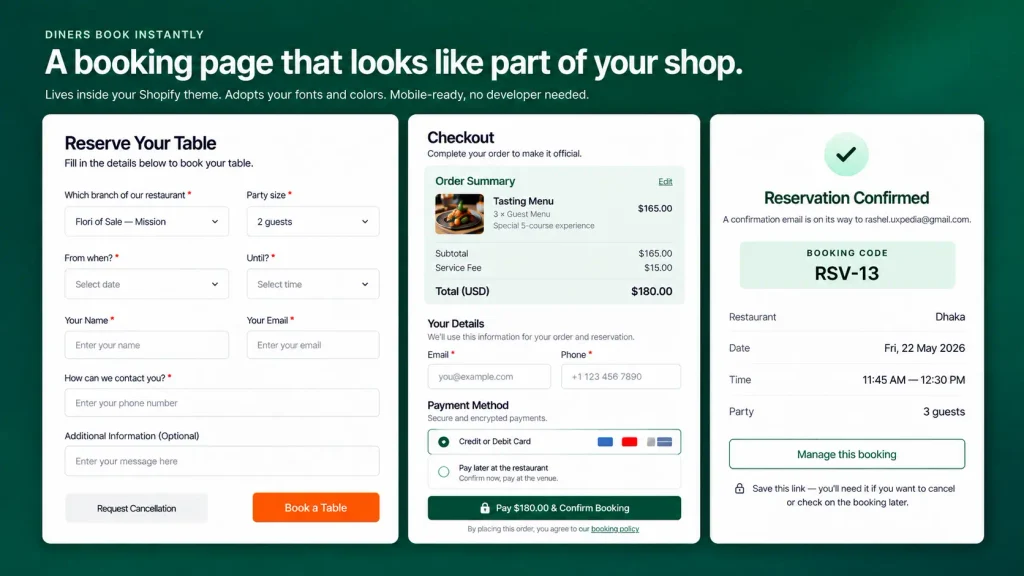
Why does that matter to a Shopify restaurant? If you already use Shopify Checkout, you may prefer reservation deposits to follow the payment workflow your staff already knows. One checkout.
One existing payment setup. One place to look when a customer asks about the charge.
What does Resos actually cost when you add restaurant features?
The €45 Basic price is not always the final monthly cost. Resos prices several optional capabilities separately, including Online payments, Waitlist, Multiple locations, API access, and custom booking fields.
The model is clearly published. The useful comparison is your actual configuration.
Current Resos plans
| Plan | Monthly bookings | Monthly price |
|---|---|---|
| Free | 25 | €0 |
| Basic | 350 | €45 |
| Plus | 750 | €85 |
| Unlimited | Unlimited | €125 |
The Free plan includes core features but does not allow paid add-ons. Basic, Plus, and Unlimited can add them.
Common Resos add-ons
| Add-on | Price |
|---|---|
| Experiences | €19.99/month |
| Online payments | €11.99/month |
| Marketing & Analytics | €11.99/month |
| Multiple locations | €11.99/month |
| Full API access | €11.99/month |
| Reserve with Facebook & Instagram | €11.99/month |
| Reserve with Google | €7.99/month |
| Customisable design | €7.99/month |
| Custom booking form fields | €7.99/month |
| Waitlist | €7.99/month |
| SMS confirmations | €0.10/SMS |
| Custom reminders | €0.10/SMS |
Resos currently lets eligible paid-plan users try paid add-ons free for 30 days before separate billing starts.
What would a realistic setup cost?
Take a single-location restaurant using Basic that wants deposits and a waitlist.
€45 + €11.99 Online payments + €7.99 Waitlist = €64.98/month
Now add another location and custom booking fields.
€64.98 + €11.99 Multiple locations + €7.99 Custom booking fields = €84.96/month
This arithmetic is more useful than comparing €45 with another app’s headline price.
For scale: Reservics Pro at $9.99 per month lists comparable categories (deposits, waitlist, up to three locations, and custom fields), although implementation depth and workflow differ between the two products. We make Reservics, so treat that as a number to verify rather than a verdict. It is still the comparison most Resos users are actually trying to run.
It also does not mean the products are identical. Resos is a dedicated hospitality platform with restaurant-specific tools and distribution options such as Reserve with Google. The point is simply to compare what you would really pay for the setup you use.
When does Cowlendar make sense?
Best for: a Shopify merchant that values an established booking app and does not need restaurant-specific floor management.
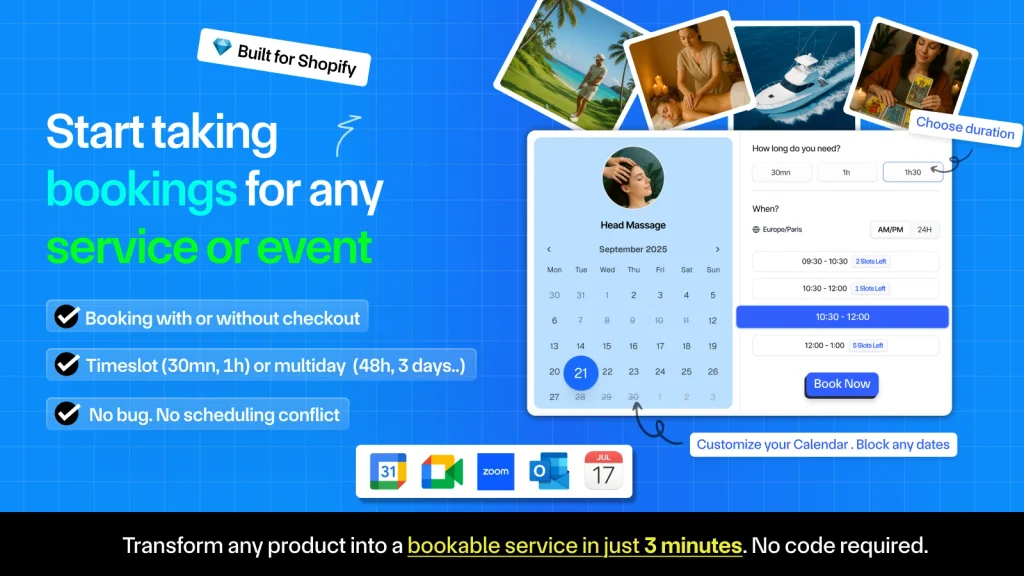
Cowlendar is built around Shopify booking use cases generally: appointments, events, rentals, private classes, tasting sessions, and venue hire sold through the same store. Its public Shopify history is far deeper than the newer restaurant apps here. The free plan allows 5 bookings per month, and paid plans are capped by booking revenue rather than booking count: Starter at $13.99 covers up to $1,000, Basic at $29.99 up to $3,000, and Growth at $59.99 up to $10,000. A busy restaurant taking deposits can move up the tiers faster than the entry price suggests.
The tradeoff is that it is a general booking product, not a tool for seating a dining room. If your host needs a visual floor plan, table states, seating logic, and front-of-house workflow, test those needs carefully before leaving Resos.
Not ideal for: restaurants where the floor itself is part of the booking workflow.
When does Reservics make sense?
Best for: a restaurant already using Shopify that wants reservations, waitlists, deposits, floor management, and POS activity closer to the same system.
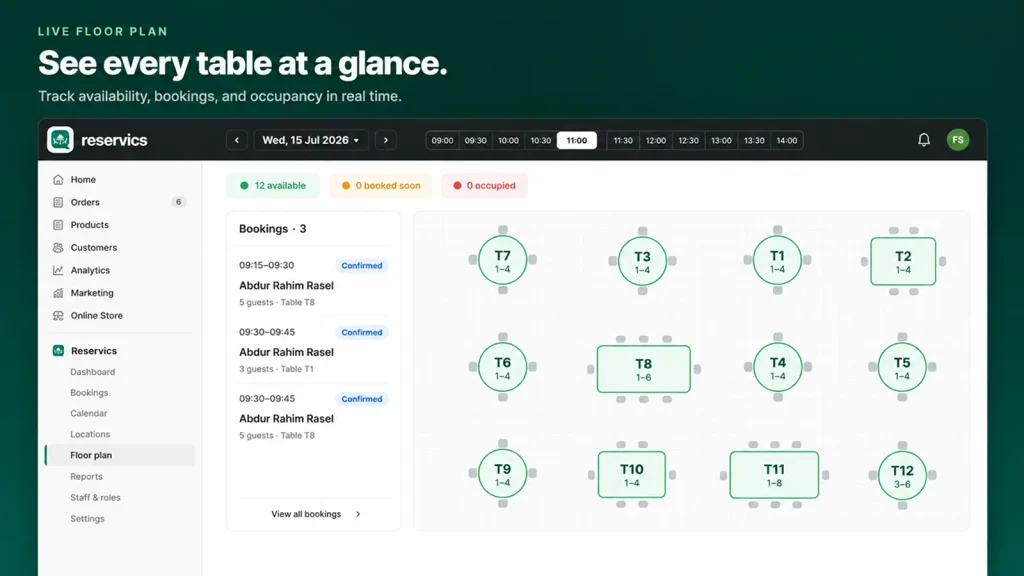
Reservics is built specifically for restaurant reservations inside Shopify.
Its current Shopify listing describes:
- restaurant table reservations
- a live floor plan
- waitlists
- deposits at checkout
- multi-location management
- walk-in seating
- Shopify POS check-in
- restaurant menus
- booking notifications
The Free plan includes one restaurant location, unlimited bookings, operating hours, date overrides, an admin calendar, an AI assistant, and booking emails.
That free tier is the sharpest contrast with Resos. Resos caps its free plan at 25 bookings per month. Reservics does not cap bookings at all on its free plan, though it limits you to one location.
Pro costs $9.99/month and adds up to three locations, Waitlist, deposits via Shopify Checkout, automatic reminders, WhatsApp integrations, custom fields, and CSV exports.
Advance costs $19.99/month and adds unlimited locations, Shopify POS, unlimited reminders, webhooks, and custom SMTP so confirmations send from your own domain.
The strongest reason for a Resos user to test Reservics is not simply the lower starting price. It is where the work happens. Reservations stay closer to Shopify Admin.
Deposits can go through Shopify Checkout. Front-of-house activity can connect with Shopify POS.
Our pick, and why we’re biased
Apselo makes Reservics. If your main reason for leaving Resos is that Shopify and your restaurant booking system feel disconnected, Reservics is the option we would test first. But you should weigh the downside too.
| Resos | Reservics | |
|---|---|---|
| Restaurant floor plan | Core product | Included |
| Deposits | Online payments add-on, via Stripe, 2% on processed payments | Pro plan, through Shopify Checkout |
| Waitlist | €7.99 add-on | Included on Pro |
| Shopify POS check-in | No Shopify POS integration listed in current Resos docs | Included on Advance |
| Free plan | 25 bookings per month | Unlimited bookings, one location |
| Reserve with Google | €7.99 add-on | Not offered |
| Public track record | Years of restaurant use | Launched 2026 |
Reservics launched in 2026 and its 5.0 rating rests on a single review, while Cowlendar has years of public Shopify feedback behind it. That is a real risk to weigh. It also does not currently replace every Resos capability. For example, Resos offers Reserve with Google as a paid add-on.
So do not move because a feature table looks good. Recreate a real Friday or Saturday service setup. Take a test booking.
Collect and refund a test deposit. Let a member of your front-of-house team use the floor plan. Then decide.
Not ideal for: a restaurant that wants years of public adoption before trusting a new reservation system.
If you want to test it, the free plan has no booking cap and Pro includes a 14-day trial. The Reservics documentation covers the setup.
When does Tablein make sense?
Best for: a restaurant that wants another dedicated hospitality platform and does not mind keeping reservation management outside Shopify.
Tablein is closer to Resos than to the Shopify-native options: a separate restaurant platform that focuses on reservations, floor operations, guest records, payments, and hospitality reporting without making Shopify the centre of everything.
Tablein’s published pricing currently starts at €67 or $79 per restaurant for Starter, followed by €117 or $139 for Growth and €177 or $209 for Success. Starter includes 50 reservations and charges €0.67 for each extra one, Growth includes 150 and charges €0.37 per extra reservation, and Success is unlimited. Every plan starts with a 14-day free trial.
If you prefer its workflow or pricing model, it belongs on your shortlist. But if your problem is that you already run Shopify and do not want restaurant data in another platform, Tablein does not fix it. You have changed the restaurant system. You have not changed where it lives.
Not ideal for: restaurants whose main goal is bringing reservation operations closer to Shopify.
What other Resos alternatives should you know about?
Two groups sit outside the three options above: other Shopify restaurant apps, and dedicated hospitality platforms that never touch Shopify.
On Shopify, BiteMe In is the other restaurant-focused booking app worth a look. Sesami, Tipo, and Easy Appointment Booking are appointment and service schedulers rather than restaurant systems, so they solve a different problem.
Off Shopify, the systems most often compared with Resos are Eat App, SevenRooms, Tock, ResDiary, Zenchef, Superb, and OpenTable. These are full hospitality platforms, and several are stronger than Resos on guest CRM, reporting, or reservation distribution.
They are not reviewed in depth here for one reason. Moving from Resos to another standalone platform keeps your reservations outside Shopify. If that separation is the thing you want to fix, a different standalone system does not fix it.
If you have not chosen a booking system yet and want the wider Shopify market, compare the full field of Shopify restaurant reservation apps.
How did we compare these options?
We compared them around one question: what changes for a restaurant already running Shopify if it moves away from Resos?
That means we looked at:
- where reservation data lives
- whether the booking product runs inside Shopify
- how deposits are processed
- restaurant-specific floor and table tools
- monthly pricing
- booking limits
- Shopify POS support
- public Shopify evidence
We checked vendor pricing pages, official product documentation, and Shopify App Store listings.
What this comparison is based on
Every price, plan limit, rating, and feature claim on this page was read from the vendor’s own pricing page, product documentation, or Shopify App Store listing on the date shown above.
We build Reservics, so that is the only product here we operate daily. We have not run a full restaurant service on Resos, Cowlendar, or Tablein, and we do not claim to have. That is why this page asks you to test your own Friday service rather than trust any feature table, including ours.
What we could not verify
Resos offers an Annual All-Access bundle that includes its paid add-ons, Online payments among them, but its public pricing page does not show a price. The 2% transaction fee still applies on All-Access. So we cannot fairly compare an unpublished All-Access quote with add-on stacking. If you need several Resos add-ons, ask Resos for the All-Access price before deciding that switching is cheaper.
That is a more useful comparison than pretending an unpublished number does not exist.
When should you stay with Resos?
Stay with Resos when the system already fits your restaurant and keeping reservations outside Shopify is not creating meaningful extra work. Switching software carries an operational cost that never shows up in a pricing table.
| Stay if | Why |
|---|---|
| Your staff already know it | Your team knows where to find a booking, check a guest note, move a table, or handle a late arrival. Changing that mid-season is expensive. |
| Restaurant depth beats the Shopify connection | The table planner, guest records, no-show tools, waitlist, and booking controls may matter more to you than keeping everything in one system. |
| The free plan fits your volume | Resos allows 25 bookings per month free. For a small café, pop-up, or tasting room, that may be enough. |
| Reserve with Google is earning its place | Resos offers it for €7.99/month. If Search and Maps already send real reservation volume, work out what it contributes before moving. |
| The payment setup is already fine | If Resos and Stripe handle your deposits without friction, moving them into Shopify Checkout may solve a problem you do not have. |
How do you move from Resos without disrupting restaurant bookings?
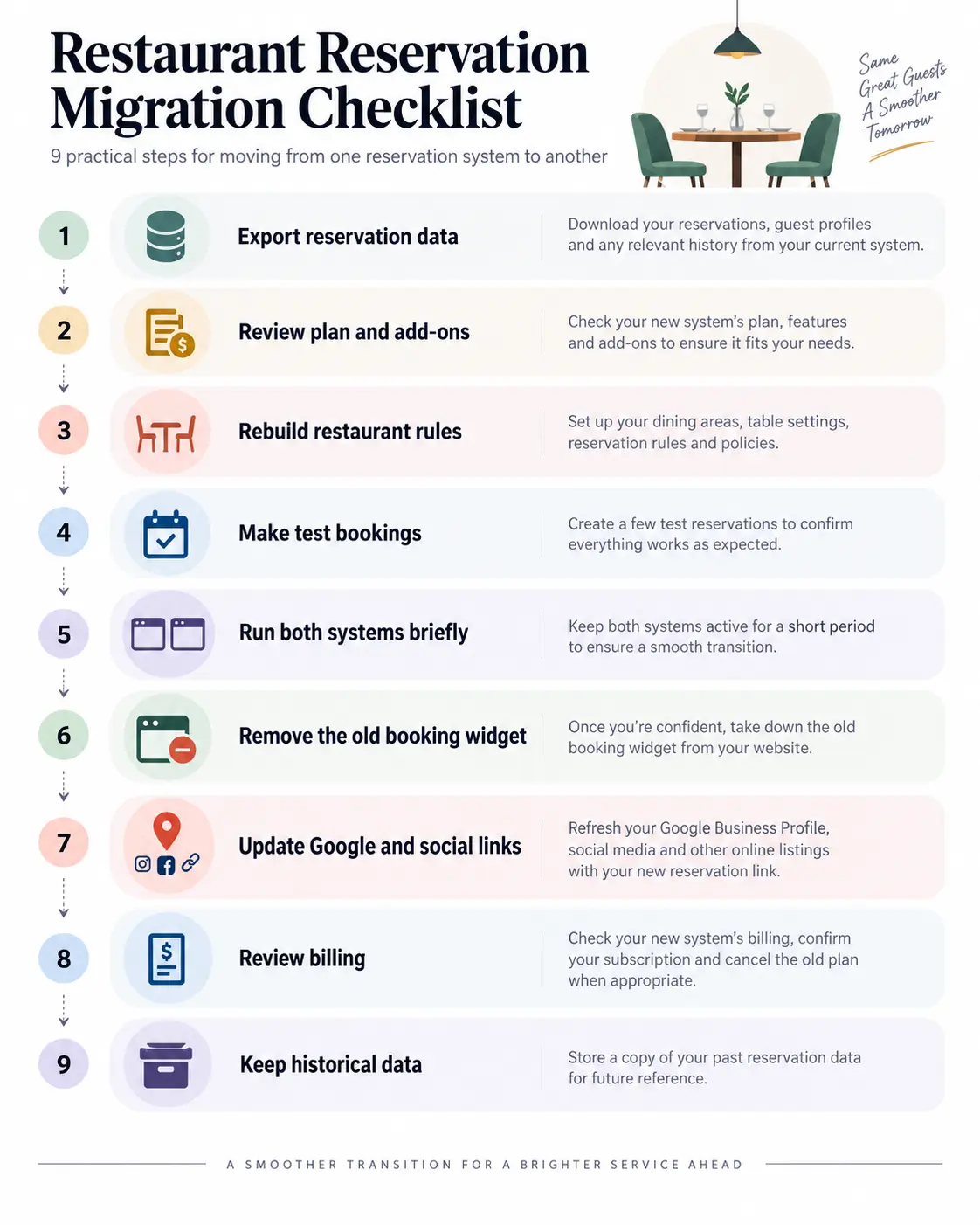
Do not replace your live booking system in one afternoon. Build the new setup first, test real restaurant scenarios, then change the public booking links once your team is comfortable.
1. Export your Resos data
Save the guest details, future reservations, notes, and other records your restaurant needs. Check what the new platform can import before editing the export.
2. Review your active Resos plan and add-ons
Write down what you currently pay for. That includes the main plan plus Waitlist, Online payments, Multiple locations, API access, custom fields, or any other active add-on. This gives you a fair baseline for the replacement.
3. Rebuild the real restaurant setup
Configure:
- opening hours
- service periods
- party-size limits
- capacity
- table rules
- blocked dates
- booking intervals
- deposit policy
Do not compare products using their default settings. If you are rebuilding inside Shopify, our walkthrough on adding table booking to a Shopify store covers the same settings step by step.
4. Make real test bookings
Book from a phone like a guest. Cancel one. Make another with a deposit.
Check what the diner receives and what your host sees. Test the refund path too if deposits matter to your operation.
5. Run both systems for a controlled overlap
Give the team time to spot missing settings before the old system disappears. Be careful with availability during the overlap so both tools cannot sell the same final table.
6. Remove the old Resos booking experience
Once the new booking flow is stable, remove the old widget, script, button, or reservation link from Shopify. Check the whole site. The old link may still be hiding in the footer, contact page, restaurant landing page, or an old promotion.
7. Change every external reservation link
Update:
- Google Business Profile
- QR codes
- email signatures
- advertising
- link-in-bio pages
- printed material where possible
Google Business Profile is easy to forget and can be one of your highest-intent booking links.
8. Review billing before closing Resos
Removing a widget from Shopify is not the same as cancelling a software subscription. Review your Resos plan and every active add-on separately.
9. Keep a historical export
Do not throw away useful booking records on launch day. Keep the data your restaurant is permitted and required to retain.
Frequently asked questions
Can I keep Resos and connect it with Shopify instead of switching?
Yes. Resos offers Zapier integrations and Full API access, currently listed at €11.99 per month. That can connect workflows between the two tools. It does not make Shopify the place your bookings live, so the two systems stay separate.
Does Resos charge 2% on every reservation?
No. The 2% fee applies only to money actually processed through the Online payments add-on, such as a deposit, prepayment, or collected no-show fee. Resos states that it charges no booking commission, cover fees, or per-booking fees. Stripe processing fees are separate.
Is there a free Resos alternative for Shopify?
Yes. The Resos Free plan allows 25 bookings per month. Reservics offers a free plan with unlimited bookings on one location, and the Cowlendar free plan allows 5 bookings per month. Check which restaurant features sit behind the paid tier before choosing on price alone.
Is the Resos All-Access plan cheaper than buying several add-ons?
Possibly. The public Resos pricing page does not publish an All-Access price, so it cannot be compared fairly with add-on stacking. If you use several add-ons, ask Resos for the current All-Access quote before deciding that switching is cheaper.
Will my Resos guest records automatically become Shopify customers?
No. Treat Resos guest data and Shopify customer data as separate unless your migration or integration explicitly connects the records. Export your guest list from Resos first, then check what the new platform can import before you edit the file.
Does removing the Resos widget cancel my subscription?
No. Removing website code does not change billing. Cancel the Resos plan and every active add-on separately from your account billing controls, then confirm the change before your next renewal date.